Sunday, July 15, 2007

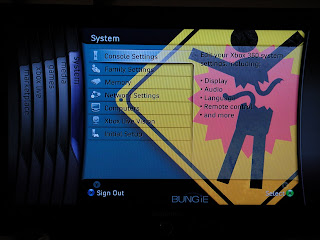
Bungie Day!

Bungie celebrated Bungie Day last week (07/07/2007 - 777), weird but it may well be the day when most get married (http://www.time.com/time/business/article/0,8599,1630320,00.html). They released a new theme and gamerpics on that day, and that day only. Listed below are the blades.

Monday, July 9, 2007

Modifing the size of your integer value

When moving a integer, from say a smaller size field (word) to say a doubleword, you should not just movw to the new register.

movw %ax, %bx

This should not be done because you can not be certain that the upper part of the EBX register is zeroed out ahead of time. To do this you should first zero out the EBX (destination) and then move your intended value there.

movl $0, %ebx
movw %ax, %bx

Intel provides another instruction that can do this with one instruction, movzx. It takes a source (a register or memory location) and converts to a larger size (register only) destination.

movl $300, %ecx
movzx %cl, %ebx

Just thought this was interesting.

Saturday, July 7, 2007

Under the C++ covers....literally

In my continuing studies of C++ I have been studing assembly language. Not from a standpoint that I will be authoring large programs written totally in assembly, but when you are down to your last options and trying to squeeze performance from a piece of code, taking a look at the assembly generated by the HLL (high level language) you can find things otherwise unseen.

Studies on Assembly: (get the cpu vendor id info)


#cpuid - program to get the processor vendor id
.section .data
output:
.ascii "Processor Vendor ID is 'xxxxxxxxxxxx'\n"
.section .text
.globl _start
_start:
movl $0, %eax
cpuid
movl $output, %edi
movl %ebx, 28(%edi)
movl %edx, 32(%edi)
movl %ecx, 36(%edi)
movl $4, %eax
movl $1, %ebx
movl $output, %ecx
movl $42, %edx
int $0x80
movl $1, %eax
movl $0, %ebx
int $0x80

This is a pretty simple assembly program. In the .data section there is a output label (think variable) defined. The .ascii is the "type" of data. In this case it means store ASCII string. The x's are placeholders for the real value coming later. The space for this data is reserved at compile time. The next section, .text, is where the instructions are stored for the program. The first instructions are to load the register EAX with a value of zero (literal). The next instruction is cpuid, which instructs the processor to get the id we are after. The zero value in EAX defines the CPUID output option. After the CPUID instruction is run, we must collect the result which will be in 3 output registers. The first instruction here (movl $output, $edi) creates a pointer from the output label to a register (EDI). Next we create pointers from the other 3 registers to the appropriate section of the EDI register. Now that all the results have been coorelated we can output the response. This program is using a Linux system call (int $0x80) to access the console from the kernel. This is a software interrupt (with the value 0x80). The EAX register will hold the specific instruction that will be executed when we make this interrupt. The EBX will hold the exit code that is given when the program exits. The ECX will hold the actual output (movl $output, %ecx). And the EDX register will hold the length of the string. Thats pretty much it. I will be posting more as my study of C++ and assembly continues.

Wednesday, July 4, 2007

Torque X for XNA creators (FREE!)

Check out one of the coolest benefits of becoming a XNA Creator Club member (http://creators.xna.com/subscribers/torquex.aspx). This is makes the $100 entry to creators club easier to swallow for some. Content is being added to the site daily (new tutorials and info). Hats off to the XNA Dev Team at Microsoft!


Friday, June 29, 2007

Size matters?

Screenshot posted from inside Bungie's realm. Apparantly this is the backend storage that will support the video/screenshot capabilities of the upcoming Halo 3. You can store as many as you like, on your local storage, but there limits, yet to be announced for public viewable ones. That's a lot of bytes though!


Thursday, June 21, 2007

Compressing Textures.....the DirectX way

Compression of textures is something that DirectX can take care of for us, but it makes sense to understand how it does this.


Consider the following gradient:


If you were required to store this in a texture, you would end up having to store hunderds of RGB values to represent it If you instead stored say 2 colors (the ends) you perform linear interpolation to get the remaining colors and you have are only storing to values. A crude calculation to do just that is here:


Color_Gradient = (Color2 - Color1) / (GradientWidth - 1);
for(i=0; i <>
{
SetPixelColor(i, 0, Color1 + (Color_Gradient * i));

}


This is roughly how DirectX can compress textures resulting in massive savings. Of course on a big texture you will probably have more than 2 colors and a simple bar object, so DirectX will partition the texture into a 4 x 4 matrix and based on the Texture Compression state chosen, will use either 1 or 2 of these grids (one for RGB and one for ALPHA) or just one and two RGB color values. The specifics of how the interpolation is performed again is dictated by the state of the Texture Compression chosen. More to come on this..

Sunday, June 17, 2007

Binary Serialization in .NET

Persisting objects to other medium for future use is one advantage of the serialization mechanisms built into the .NET Framework. Listed below is are 2 code sections showing serialization and deserialization to disk.

SERIALIZE:


FileStream fStream = new FileStream(ConfigurationManager.AppSettings[1].ToString(), FileMode.Open);
BinaryFormatter bin = new BinaryFormatter();
htObject = bin.Deserialize(fStream) as Hashtable;

DESERIALIZE:


Stream binstream = File.OpenWrite(ConfigurationManager.AppSettings[1].ToString());
BinaryFormatter binFmtr = new BinaryFormatter();
binFmtr.Serialize(binstream, m_hashTable);
binstream.Close();

This can be useful in XNA programming. More C++ for DirectX9 posts will be coming next week.